

SMS payment reminders: a practical guide for UK businesses
SMS payment reminders: a practical guide for UK businesses

SMS payment reminders are automated text messages sent to clients to prompt invoice settlement before or after a due date. For small business owners and freelancers in the UK, they represent one of the most direct ways to reduce late payments without picking up the phone or drafting lengthy emails. Cash flow is not vanity. It is survival. A well-timed text message billing alert, sent at the right moment with the right tone, can recover payment in minutes rather than weeks. This guide covers what to include, when to send, how to automate, and what to avoid.
What should every SMS payment reminder include?
Effective payment reminder SMS must include four core elements: your business name, the invoice number, the exact amount due, and a direct payment link. These four details remove every reason a client has to delay. They know who is asking, what they owe, and exactly how to pay.
Beyond those four essentials, a well-constructed message also needs:
- Business name — always identify yourself clearly at the start of the message. Clients receive many texts and will not act on an anonymous one.
- Invoice reference number — this gives the client a specific document to locate if they need to verify the charge.
- Exact amount due — round figures cause confusion. State the precise sum, including pence where relevant (for example, £1,247.50).
- Direct payment link — clickable payment links reduce friction and speed up settlement. A client who can pay in two taps will pay faster than one who has to log into a portal separately.
- Clear call to action — one sentence is enough. “Please settle by 15 March 2026” is clearer than a vague “please arrange payment at your earliest convenience.”
- Opt-out instruction — including “Reply STOP to opt out” is a compliance best practice that also signals professionalism. It tells clients you respect their preferences.
Pro Tip: Keep your SMS under 160 characters where possible. Messages that spill into two parts look unprofessional and cost more to send. Put the payment link last so it does not break the flow.
The tone of this first message should be warm and matter-of-fact. You are not accusing anyone of anything. Most late payments happen because of forgetfulness, not bad faith.
How should you time your SMS payment reminders?
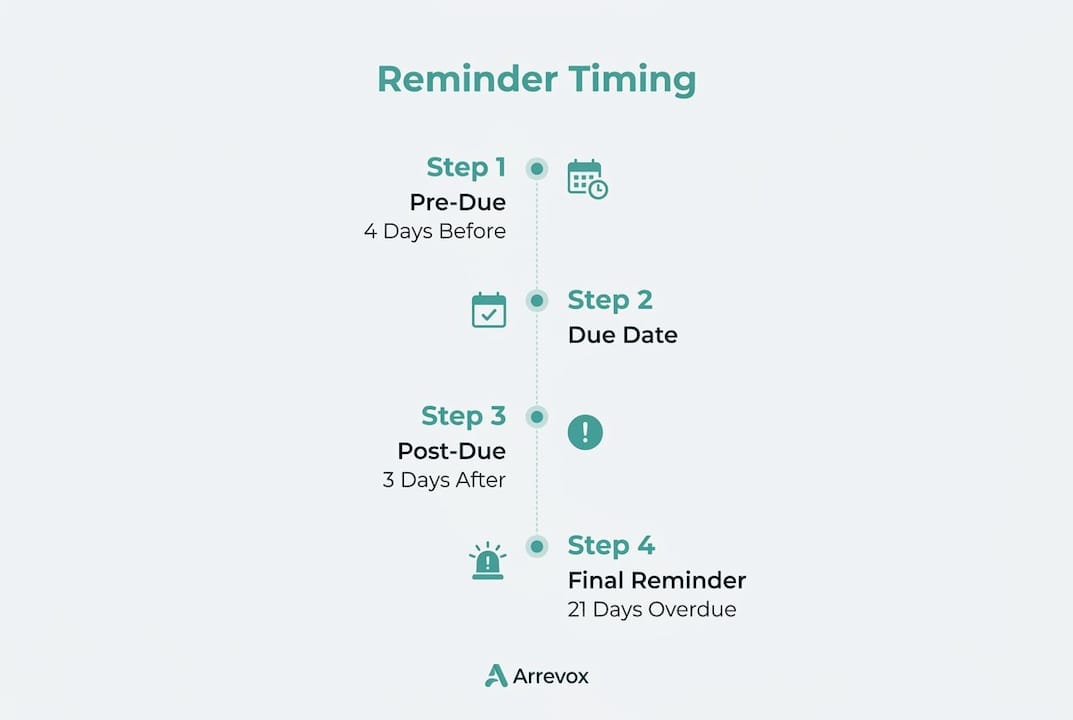
Timing is the single biggest factor in whether a payment reminder text produces results. Send too early and it feels presumptuous. Send too late and the debt has already aged. A structured reminder schedule of 3–5 days before the due date, on the due date itself, then at 7, 14, and 21 days after a missed deadline gives you a clear framework without overwhelming the client.
Here is how that sequence works in practice:
- 3–5 days before the due date — a friendly pre-due nudge. Mention the invoice number, amount, and due date. Keep the tone light. This message alone resolves a large proportion of late payments because the client simply had not noticed the deadline approaching.
- On the due date — a calm, factual reminder. State that payment is due today and include the payment link again. No accusatory language.
- 7 days overdue — the tone shifts slightly. Acknowledge that the invoice is now overdue and ask the client to settle or get in touch if there is an issue.
- 14 days overdue — a firmer message. Reference the outstanding amount, note that the invoice is now two weeks late, and state that you may need to apply statutory interest if payment is not received promptly.
- 21 days overdue — this is your final automated message before you consider escalation. Keep it professional but direct. State the next steps clearly.
The progression from friendly to firm is deliberate. Industry experts stress that this tone escalation maintains client goodwill while making the seriousness of the situation clear. Jumping straight to a stern tone on day one damages relationships and rarely speeds up payment.
For timing within the day, mid-morning on a Tuesday, Wednesday, or Thursday tends to produce the best response rates. Avoid sending payment due text alerts on a Monday morning, Friday afternoon, or at weekends. Clients are either catching up from the weekend or winding down for it.
“The primary cause of late payments is forgetfulness, not unwillingness or insolvency. A polite, well-timed reminder is often all it takes to prompt a client to act.”
How do you set up automated SMS payment reminders?
Automation is what separates a one-off text from a reliable collections process. Automated payment reminders reduce Days Sales Outstanding (DSO) and cut the administrative effort of manual chasing significantly. That means more time on billable work and less time staring at an overdue invoice list.
Connecting your SMS tool to your billing system
The first step is choosing an SMS platform that integrates with your accounting or invoicing software. Many accounting platforms used by UK small businesses and freelancers support webhook or API connections to SMS services. Once connected, the system can read invoice status, due dates, and client contact details automatically.
Setting up trigger-based workflows

A trigger-based workflow fires a message when a specific condition is met. For example: “If invoice status is unpaid and due date is in 4 days, send message template A.” You build this logic once and it runs without further input. The critical rule here is that automation must immediately stop all scheduled reminders the moment payment is recorded. Sending a chasing text to a client who paid yesterday is embarrassing and erodes trust.
Key steps for setting up your workflow:
- Map your reminder sequence (pre-due, due date, overdue intervals) before touching any software.
- Create a separate message template for each stage, with tone escalating appropriately.
- Set the payment-received trigger as a cancellation condition for all pending messages in the sequence.
- Personalise each template with the client name, invoice number, and amount using merge fields.
- Test the full sequence with a dummy invoice before going live.
Pro Tip: Build a short pause of at least 24 hours into your system between payment confirmation and any final “thank you” message. This prevents the system from firing a thank-you text before the payment has fully cleared.
Monitoring and adjusting your workflows
Review your reminder sequence every quarter. Check which messages in the sequence produce the fastest response and which ones generate opt-outs or complaints. Adjust the timing or wording accordingly. A workflow that worked well six months ago may need refreshing as your client base changes.
| Workflow stage | Trigger condition | Message tone |
|---|---|---|
| Pre-due reminder | 4 days before due date | Friendly and informative |
| Due date alert | Invoice due today, unpaid | Neutral and factual |
| First overdue | 7 days past due date | Polite but direct |
| Second overdue | 14 days past due date | Firm, mentions statutory interest |
| Final notice | 21 days past due date | Serious, states next steps |
What are the most common mistakes with SMS payment reminders?
Even a well-designed reminder sequence can backfire if you make avoidable errors. The most damaging mistakes fall into three categories: tone, frequency, and compliance.
Excessive messaging causes reminder fatigue. When clients receive too many texts in a short period, they disengage entirely. They may opt out of SMS communications, making future contact harder. Worse, they may associate your brand with harassment rather than professionalism. Space your reminders as outlined in the timing sequence above and resist the urge to add extra messages between stages.
Aggressive or threatening language is the second major pitfall. Phrases like “legal action will be taken immediately” in an early reminder are disproportionate and can damage a long-standing client relationship over what may be a simple oversight. The tone should escalate gradually, not leap from polite to threatening in one message.
Compliance is the third area where businesses get into difficulty. UK businesses sending automated SMS messages must give recipients a clear way to opt out. Including “Reply STOP to opt out” in your messages is a recognised best practice for both compliance and relationship management. Keep records of opt-out requests and honour them immediately.
Two further practical issues to address:
- Failed delivery — if a message fails to deliver, check whether the contact number is correct before resending. Do not assume the client is ignoring you.
- Client responses — some clients will reply to your automated text with a question or a request for more time. Have a process for handling these replies personally. Automation handles the volume; human judgement handles the exceptions.
Key takeaways
Automated SMS payment reminders, sent in a structured sequence with the right tone and a direct payment link, are the most reliable way for UK small businesses and freelancers to reduce late payments without damaging client relationships.
| Point | Details |
|---|---|
| Include four core elements | Every message needs your business name, invoice number, exact amount, and a payment link. |
| Follow a structured sequence | Send reminders at 3–5 days before, on the due date, then at 7, 14, and 21 days overdue. |
| Escalate tone gradually | Start friendly and progress to firm. Never open with aggressive language. |
| Automate with a cancellation trigger | Stop all pending reminders the moment payment is confirmed to avoid embarrassment. |
| Respect opt-out requests | Include “Reply STOP” in every message and honour requests immediately for compliance and trust. |
Why the human element still matters in automated reminders
I have seen businesses set up a perfectly logical reminder sequence and then wonder why a long-standing client went cold. The sequence was technically correct. The timing was right. But the messages read like they came from a debt recovery agency, not a trusted supplier.
Automation handles the volume. It does not handle the relationship. My view is that the tone of your automated messages should sound like something you would actually say to a client face to face. If you would not open a conversation with “Your account is now seriously overdue,” do not let your automation say it either.
The other thing I have noticed is that businesses treat automation as a set-and-forget system. They build the workflow once and never revisit it. Client relationships change. A client who was always prompt may hit a difficult patch. A new client may need a softer introduction to your payment process. The best reminder sequences I have seen are reviewed regularly and adjusted when something is not working.
The goal is not to extract money. The goal is to get paid while keeping the client. Those two things are not in conflict if you approach the process with care.
— Sean
How Arrevox helps UK businesses get paid on time
Chasing invoices manually takes time that most small business owners and freelancers simply do not have.
Arrevox is built specifically for UK small businesses and freelancers who want to automate their payment reminder process without losing the professional tone that keeps clients coming back. The platform connects to your existing accounting system, sets up trigger-based reminder workflows, and adjusts the tone of each message from a polite pre-due nudge to a firm final notice. When payment is received, reminders stop automatically. Arrevox also provides cash flow analysis so you can see the real impact of outstanding invoices on your business. Less chasing, better cash flow, and client relationships that stay intact.
FAQ
What are SMS payment reminders?
SMS payment reminders are automated text messages sent to clients to prompt them to settle outstanding invoices. They typically include the invoice number, amount due, and a direct payment link.
How many reminder texts should I send before escalating?
A structured sequence of five messages, covering the period from 3–5 days before the due date through to 21 days overdue, is the recognised best practice. Beyond that, consider a personal call or formal notice.
Do I need to include an opt-out option in my payment reminder texts?
Yes. Including “Reply STOP to opt out” is a compliance best practice for automated SMS communications in the UK. It also protects your client relationships by demonstrating respect for their preferences.
What happens if a client pays after I have already sent a reminder?
Your automation should be set up with a payment-received trigger that cancels all pending messages in the sequence immediately. Sending a chasing text to a client who has already paid damages trust and looks unprofessional.
Can SMS reminders really improve cash flow?
Automated payment reminders reduce Days Sales Outstanding and cut the time spent on manual collections. Faster payment cycles mean more predictable cash flow, which is particularly valuable for freelancers and small businesses managing payroll or supplier costs.